Overview
In the QQube Configuration Tool, the synchronization log list may display a red entry similar to Error: 80040438 - CLICK TO FIX. Select that red status link to open this guide.
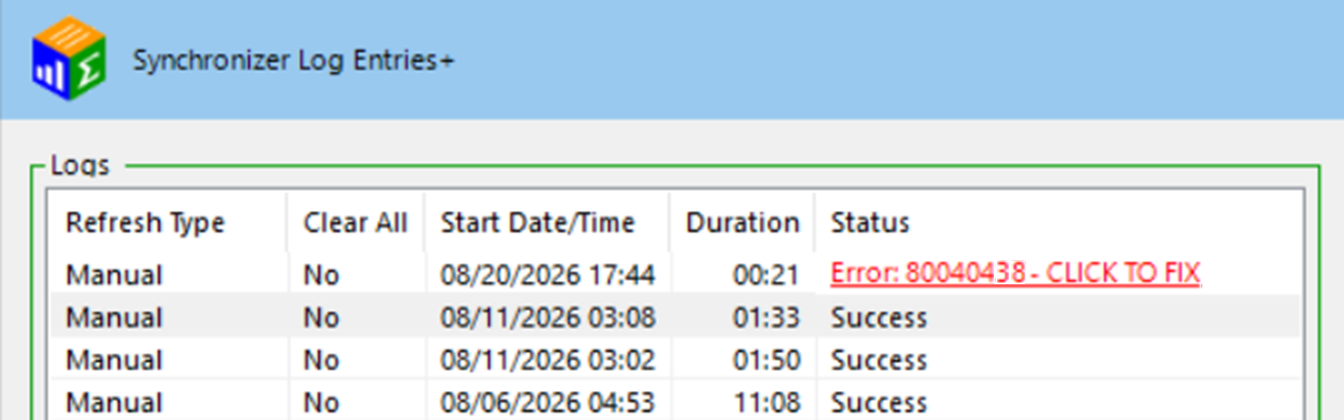
Resolve every failed entry
A later synchronization that reports Success does not mean this earlier error corrected itself. The failed entry must still be reviewed and resolved.
The detailed synchronization log for this entry contains a message similar to the following:
Detailed synchronization log message
<<<<<<<<<<<<<<<<<<<<<< 10/15/2027 06:44:57 PM >>>>>>>>>>>>>>>>>>>>>>
BeginSession
Error Code: 80040438
The application trying to connect to QuickBooks is not supported while multiple instances of QuickBooks are running.
<<<<<<<<<<<<<<<<<<<<<<<<<<<<<<<<<<<<<<<<<<<<<<<<<<<<<<<<<<<<<
What the Error Means
Error 80040438 comes directly from the Intuit Software Development Kit. QQube cannot communicate with QuickBooks while multiple instances of QBW32.EXE are running under the Windows user where the synchronization occurs.
QuickBooks may allow more than one company-file window to be opened manually, but the Intuit SDK cannot operate while multiple QuickBooks instances are running in the synchronization session.
Where the Problem Occurs
| Environment | Windows User to Check |
|---|---|
| Single-User workstation | The Windows user currently running QQube and QuickBooks. |
| Multi-User server | The dedicated Windows synchronization user where QQube was installed. |
Resolution
Complete these steps under the Windows user where QQube synchronization runs.
1. Close All QuickBooks Instances
Close every open QuickBooks window in the synchronization session.
2. Check Windows Task Manager
Open Windows Task Manager and confirm that only one instance of QBW32.EXE remains.
If more than one instance is running, close the extra QuickBooks process before starting the synchronization again.
3. Synchronize Again
Start the QQube synchronization again after only one QuickBooks instance remains in the synchronization session.
Expected Result
Only one QuickBooks instance is running under the QQube synchronization Windows user, and the synchronization completes without Error 80040438.
Was this article helpful?
That’s Great!
Thank you for your feedback
Sorry! We couldn't be helpful
Thank you for your feedback
Feedback sent
We appreciate your effort and will try to fix the article